
How to Register at Bandit Casino in India
Opening a Bandit account takes about two minutes. You can sign up with an email address or an Indian mobile number, or skip the form with Google or Steam. This page walks through each field of the form, explains the bonus toggle and the promo code, and tells you what Bandit may ask for before your first withdrawal.
Sign up at BanditSee the steps
18+ only · Affiliate link: we may earn a commission · Bandit holds an Anjouan licence, not an Indian one · Wagering and minimum deposit to be confirmed in the bonus terms
Facts checked on the Bandit site ·

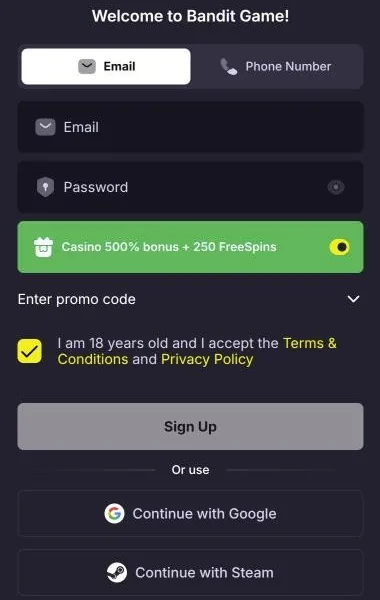
The Bandit sign-up form, field by field
| Field | What to do |
|---|---|
| Email / Phone Number | Two tabs. Pick one; you will log in with it later. |
| Password | At least one you have never used elsewhere. |
| Casino 500% bonus + 250 FreeSpins | On by default. Leave it on for the pack, or switch it off. |
| Enter promo code | Optional. Only for a campaign code you already have. |
| 18+ and Terms | Required. Confirms your age and that you accept the Terms and Privacy Policy. |
| Google / Steam | Sign up in one tap with an existing account instead of the form. |
The form never asks for your bank or UPI details. Payment details come later, in the cashier, when you choose to make a deposit.
Register at Bandit in seven steps
- Press Sign UpOpen Bandit and press the green Sign Up button in the top corner.
- Choose Email or Phone NumberPick a tab and enter an email you check or your mobile number.
- Set a passwordUse a password you do not use anywhere else.
- Decide on the bonusThe “Casino 500% bonus + 250 FreeSpins” toggle is on by default. Switch it off if you do not want the pack.
- Add a promo codeOpen “Enter promo code” only if you have a campaign code.
- Confirm 18+ and the termsTick the box to confirm you are 18 or older and accept the Terms & Conditions and Privacy Policy.
- FinishPress Sign Up. Or skip the form and continue with Google or Steam.
On the Bandit home page you will also see Telegram and Discord icons next to Google and Steam. The sign-up window in the screenshot above shows Google and Steam only, so use those two if the others do not appear for you.
18+ only · Affiliate link: we may earn a commission · Bandit holds an Anjouan licence, not an Indian one · Wagering and minimum deposit to be confirmed in the bonus terms
The bonus toggle is on by default
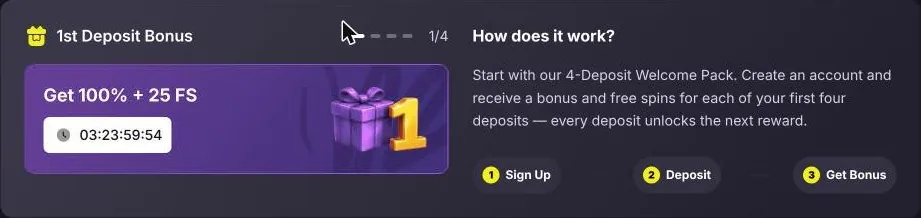
This is the detail most new players miss. The green “Casino 500% bonus + 250 FreeSpins” switch on the sign-up form is already turned on. If you leave it as it is, your account is set up for the 4-deposit welcome pack, and your 1st deposit will be matched 100% with 25 free spins.
That is good if you want the pack. It is not ideal if you prefer to cash out freely, because bonus money carries wagering conditions. Switch it off before you press Sign Up if you would rather play with your own money only. All four steps and the open questions about wagering are on our Bandit bonus page.
Verification (KYC) before you withdraw
Bandit publishes an AML & KYC policy in its footer. Like most casinos, it checks who you are before it pays out, to stop underage play, fraud and money laundering. The exact documents are not listed on the pages we checked, but casinos usually ask for:
- a photo ID, such as a passport or another government ID that shows your name and date of birth;
- a recent proof of address;
- proof that the card or wallet you used belongs to you.
Upload documents only inside your Bandit account, never by email to someone who contacts you first. Be aware that the Indian ban on online money games means payouts can be delayed or blocked by your bank; see our note on the law.
Your first deposit and the 100% + 25 FS step
After sign-up, open the cashier and choose a payment method. Crypto coins and card purchases through Visa, Mastercard, Google Pay and Apple Pay were shown on the site; rupee balances and UPI were not, so check before you pay.
With the toggle on, the 1st deposit unlocks 100% + 25 free spins and starts that step’s timer. Set a deposit limit in your account before you pay. Already have an account? Go to Bandit login help. Playing on a phone? See the Bandit mobile site and app.
Sign-up offer
100% + 25 FS
First of four steps, up to 500% + 250 FS in total.
Create my Bandit account18+ only · Affiliate link: we may earn a commission · Bandit holds an Anjouan licence, not an Indian one · Wagering and minimum deposit to be confirmed in the bonus terms
Bandit sign-up questions
How do I register at Bandit?
Press Sign Up, choose Email or Phone Number, enter it with a password, keep or switch off the 500% bonus toggle, add a promo code if you have one, confirm you are 18+ and accept the terms, then press Sign Up. Google and Steam sign-up skip the password step.
Can I sign up with my phone number?
Yes. The form has an Email tab and a Phone Number tab. Choose Phone Number, enter your mobile number with the country code and set a password.
Do I need a promo code?
No. The welcome pack comes from the bonus toggle, which is on by default. The promo code field is only for campaign codes; if you have one, enter it during sign-up.
Do I need KYC at Bandit?
Expect identity checks before your first withdrawal, and possibly earlier, under Bandit’s AML & KYC policy. The exact documents are not listed on the pages we checked, so ask support or check the policy in the footer.
Can I open a second account?
Casino terms normally allow one account per person, household or device, and duplicates can lead to bonuses being cancelled and the account being closed. Check the Bandit terms before you try.